Load a pinned 3D cylinder and hear the music encoded in its geometry. No prerecorded melody is attached to the model.
Make a cylinder with AI
Paste this prompt into an AI chat with web browsing, code execution and file downloads. Replace [MELODY NAME] with your favorite melody, or up to five titles separated by semicolons. The AI will research the notes and generate its best arrangement; a MIDI file is optional for later refinement.
Model testing: Testing to date covered the earlier JSON prompt on higher-tier reasoning models. Free, non-reasoning models have not been tested.
Download my-cylinder.glb from the AI chat, then choose Load cylinder to play it here.
Start with “Export playable .GLB”. It gives you a ready-to-play cylinder that opens in Blender and Three.js. Keep the body and edit, move, add or delete the separate pin objects. Load it back here to play the result.
How the 3D pins become music
The cylinder’s axis is X, with 72 equally spaced tooth positions along its length. The pin’s X coordinate selects the tooth. Its angle around the cylinder selects the moment in one revolution. Multiple pins at the same angle play a chord. Speed changes timing, not pitch.
LOW NOTES
← X: which tooth →↻ Angle: when it plays
HIGH NOTES
Supported files
.GLB (recommended) or a .glTF with embedded buffers, uncompressed, under 35 MB. Separate meshes named pin_00001, pin_00002, etc. are most reliable. Individual unnamed small pins and connected pin tips in a merged mesh are also scanned. A plain cylinder, a bump map, a photograph or an arbitrary decorative mesh does not contain enough note information.
Models without the supplied metadata are centered and fitted from an X-, Y- or Z-aligned barrel. Their default is 30 seconds per revolution and C2–B7 tuning; adjust the duration here. The import preserves the mesh geometry and basic material colors; custom textures, animation and compression extensions are not imported.
Canonical cylinder coordinates
Metres; centered on the origin; body radius 0.024; length 0.214; tooth centers from x = −0.099 to +0.099. For tooth i, time t and revolution duration T:
x = -0.099 + i × 0.198 / 71
θ = 2.0 - 2π × t / T
y = 0.02475 × cos(θ)
z = 0.02475 × sin(θ)
Place the center of a 1.5 mm long radial pin there, pointing outward. The supplied GLB has a musicBox object in the root node’s glTF extras with the tuning, duration and geometry conventions. Pin extras.velocity is optional.
Indexed cylinders add turn × 0.00055 metres to each pin’s X coordinate. At the start of each successive tune, the barrel moves left by 0.55 mm to align that track with the comb. JSON uses turns for the number of revolutions and a zero-based turn on each pin. These offsets are simulation conventions.
A simpler authoring route
Use Compose a cylinder to place pins on a piano-roll grid, or upload a JSON definition. It produces real 3D pins, which you can export as GLB.
{
  "format": "crescendo-cylinder",
  "version": 1,
  "title": "My first cylinder",
  "duration": 8,
  "notes": [
    {"time": 0,   "midi": 60},
    {"time": 0.5, "midi": 64},
    {"time": 1,   "midi": 67},
    {"time": 2,   "midi": 72}
  ]
}
About this reconstruction
This procedural reconstruction depicts the walnut case, brass cylinder and drive, steel comb, bearings, gears and winding key of an interchangeable cylinder music box. It draws on the Reuge Crescendo 15.72 and the reference photograph below. Successive tunes occupy closely spaced axial pin tracks; after each revolution, the cylinder indexes sideways with a mechanical knock. Exploded view separates the assemblies and reveals the coiled mainspring.
The cylinders use independently arranged classical melodies. Factory pin layouts and tuning have not been reproduced. The 72-tooth comb uses configurable C2–B7 tuning, and the sound is synthesized from damped vibration modes. Dimensions, spring motion and acoustic response are illustrative. This is an independent simulation.
Repertoire source: Reuge 2014 collection catalogue. The project was inspired by “Magic Flute / The Birdcatcher’s Song / Glockenspiel – Mozart Music Box (REUGE)” by Wakey Lad93.
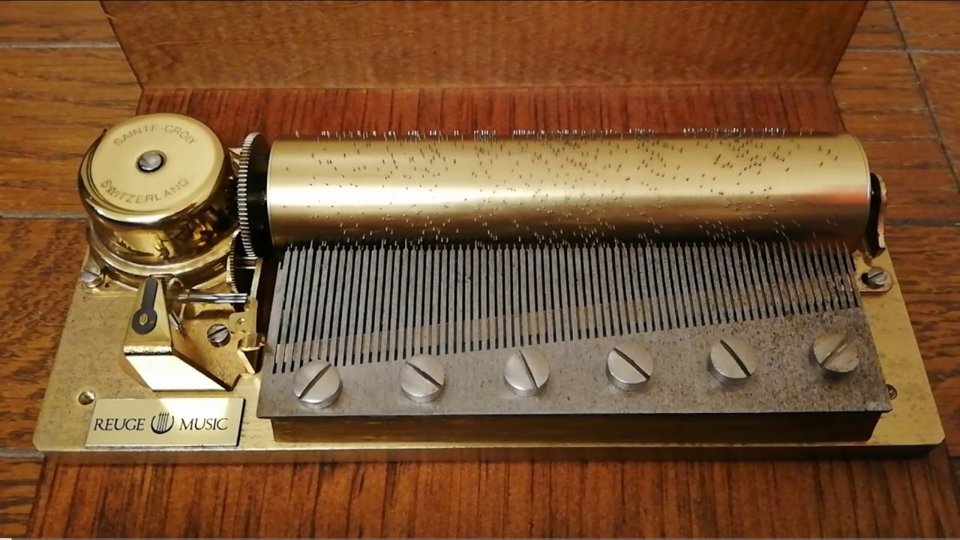
Reference photograph of the original music box mechanism.
Controls & privacy
Drag to orbit; Shift-drag or right-drag to pan; scroll to zoom. On touchscreens, use two fingers to pan and pinch to zoom. Touch any part of a comb tooth to audition it. Explode reveals the spring and separates the mechanism; fullscreen gives the scene the entire display. Show resonance adds fading horizontal note trails to the pin timeline. Space plays or pauses, R rewinds, and 1 / 2 / 3 select the cameras. Playback pauses when the tab is hidden. All rendering, file parsing and audio generation happen locally in the browser.